


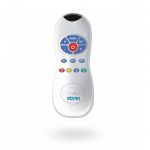
The Remote Control is available for easy maintenance of extensive installations requiring custom settings.
One big advantage to the sensor is its nonvolatile memory that will retain the stored adjustments even in case of power failures or if the battery is replaced.

This function is ideal to maximize hygiene and prevent Legionella and other diseases. It also helps to prevent pipes from freezing, keeping the water moving through the pipes every 24 hours.To activate or deactivate the hygiene flush, press the clock button. Wait until a quick washing of the red light of the sensor eye is perceived. Then press + to activate the
hygiene flush or – to deactivate it.

It is possible to program a lock out time in our products upon request.This lock out time allows a user to activate the faucet, ush valve or shower only after a speci c amount of time has passed. For example, a shower control at a camping site can limit users to have a shower only after 20 seconds has passed since the last use.
If a speci c lock out time was preset in a product as default, and you would like to deactivate it, press the lock button. Wait until a quick ashing of the red light of the sensor eye is perceived. Then press – to deactivate the lock out time.
To activate it again, press the lock button and without releasing it, press the + button once.

This function is ideal to perform any kind of activity in front of the sensor without operating the system (for example, cleaning).
Faucets and ush valves will remain shut for 1 minute and showers will remain closed for 2 minutes when this button is pressed once.To cancel this function and to return to normal operation press the On/Off button again or wait 1 or 2 minutes depending on the product.

This function allows the sensor to return to the original factory preset settings.
If your product includes a self adjusting sensor, the RESET button restores all the factory settings except for the sensor range.To enter the self adjusting mode, use the ADJ button. To change the sensor range, use the RANGE button.
If required, press the Reset button and the + button together.

The detection range refers to the greatest distance an object can be located to activate the system.
The sensor range in all our infrared products can be changed using this button on the remote control.
Press the Range button. Wait until a quick ashing of the red light of the sensor eye is perceived.Then, press + to increase the detection range and – to reduce it.

This button operates products including a self adjusting sensor only.
Check that no objects are in front of the sensor. Press the ADJ button. Once a quick ashing of the red light of the sensor eye is perceived, remove your hand holding the remote control and move away from the sensor area.The ideal sensor range for the specific location will be set automatically. Once the self-adjustment has taken place the solenoid valve will be opened and closed for 1 second as an indication that the ideal sensor range was set and the product is ready for use.

The Security time, present in faucets and shower controls, prevents continuous ushing of water due to reflection or vandalism. By default, if the sensor is covered for more than 90 seconds for faucets or 10 minutes for showers, the water flow will shut off automatically. To resume regular operation any obstruction must be removed.
Press the SEC button. Wait until a quick flashing of the red light of the sensor eye is perceived. Then, press “+” to increase the security time and “–” to reduce it.

This button applies to flush valves for toilets with an infrared dual flush system. On these flush valves, the full flush time can be changed using the following button (two wave button) and the short flush can be changed by using this one. If required, the short flow time can be modified as follows: Press the one wave button. Wait until a quick flashing of the red light of the sensor eye is perceived.Then, press “+” to increase the short flow time and “–” to reduce it.

This button allows changing the flush valves flush time, once the user leaves the urinal or the toilet.
In flush valves for toilets with dual flush system this button allows changing the full flush time.
If required, the flow time can be modified as follows: Press the two waves button. Wait until a quick flashing of the red light of the senzor eye is perceived. Then, press “+” to increase the flow time and “-” to reduce it.

It is recommended to change the delay in time for flush valves for urinals or toilets only. Due to the delay in setting, the senzor will only activate the system if the user is detected for the preset amount of seconds.
If required the delay in time can be modified as follows: Press the IN button. Wait until a quick flashing of the red light of the sensor eye is perceived. Then, press “+” to increase the delay in time and “-” to reduce it.

This button allows modifying the water flow time after the user removes his hands from the faucet or steps out of the shower. A delay out time close to 0 will save more water. An increased delay out time will make the user experience more comfortable.
For flush valve applications, the delay out time function allows modifying the time interval the water starts to flush after the user has left the toilet or urinal. In this case, a delay out time close to 0 will not give the user the possibility to be away from the sanitary. An increased delay out time will make the user experience more comfortable, but high traffic of users should be taken into consideration.
If required, the delay out time can be modified as follows:
Press the OUT button. Wait until a quick flashing of the red light of the sensor eye is perceived. Then, press “+” to increase the delay out time and “-” to reduce it.